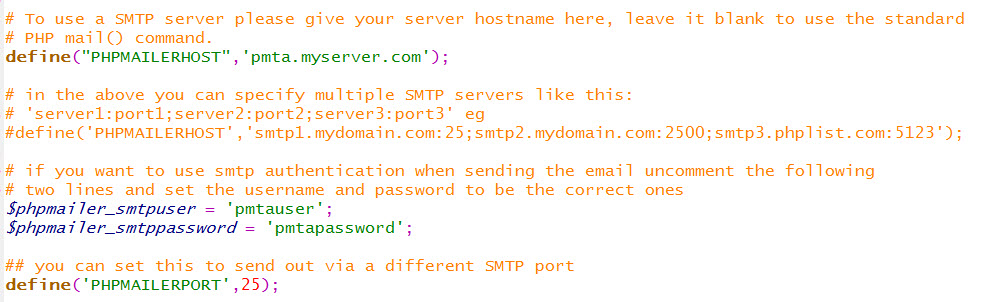
PHPList 通过 PowerMTA (PMTA) 群发邮件的配置
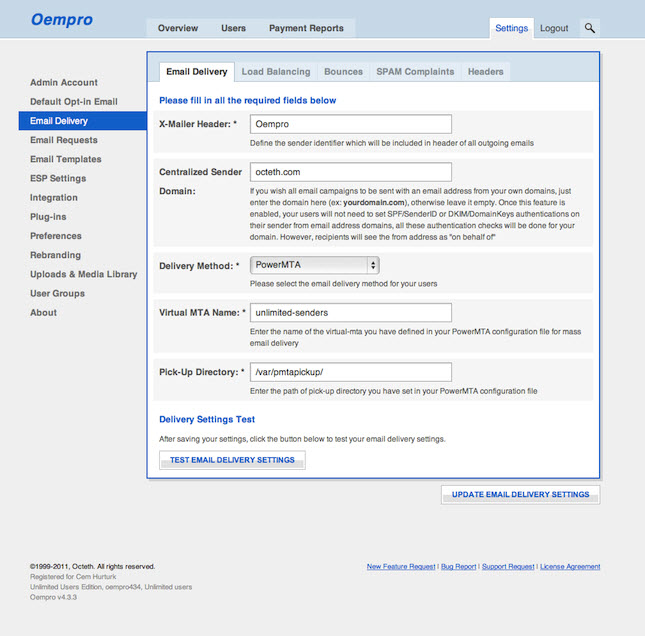
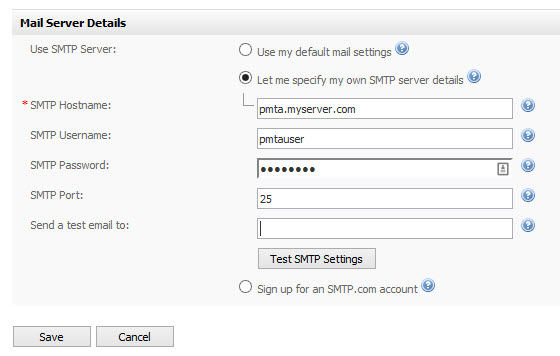
#
# $Id: config 2015-03-24 16:00:00 Jack $
# Sample PowerMTA configuration file
# PowerMTA 多个虚拟 PMTA config 的配置文件实例

#
# E-mail address for mailer's administrator (please specify!)
#
postmaster admin@mydomain.com
domain-key my-domain,*,/etc/dkim.key

#
# Settings per source IP address (for incoming SMTP connections)
#
<source 127.0.0.1>
    always-allow-relaying yes   # allow feeding from 127.0.0.1
    process-x-virtual-mta yes   # allow selection of a virtual MTA
    max-message-size 0          # 0 implies no cap, in bytes
    smtp-service yes            # allow SMTP service
    allow-mailmerge yes
</source>

<source 23.45.67.100>           # phplist or oempro installed
    always-allow-relaying yes   # allow feeding from mailer.mydomain.com
    process-x-virtual-mta yes   # allow selection of a virtual MTA
    max-message-size 0          # 0 implies no cap, in bytes
    smtp-service yes            # allow SMTP service
    hide-message-source true
    remove-header Received
    allow-mailmerge yes
</source>

<source 102.202.33.2>
    always-allow-relaying yes   # allow feeding from 102.202.33.2
    process-x-virtual-mta yes   # allow selection of a virtual MTA
    max-message-size 0          # 0 implies no cap, in bytes
    smtp-service yes            # allow SMTP service
    hide-message-source true
    remove-header Received
</source>

<source 102.202.33.3>
    always-allow-relaying yes   # allow feeding from 102.202.33.3
    process-x-virtual-mta yes   # allow selection of a virtual MTA
    max-message-size 0          # 0 implies no cap, in bytes
    smtp-service yes            # allow SMTP service
    hide-message-source true
    remove-header Received
</source>

<source 102.202.33.4>
    always-allow-relaying yes   # allow feeding from 102.202.33.4
    process-x-virtual-mta yes   # allow selection of a virtual MTA
    max-message-size 0          # 0 implies no cap, in bytes
    smtp-service yes            # allow SMTP service
    hide-message-source true
    remove-header Received
</source>

<source 102.202.33.5>
    always-allow-relaying yes   # allow feeding from 102.202.33.5
    process-x-virtual-mta yes   # allow selection of a virtual MTA
    max-message-size 0          # 0 implies no cap, in bytes
    smtp-service yes            # allow SMTP service
    hide-message-source true
    remove-header Received
</source>

<source 102.202.33.6>
    always-allow-relaying yes   # allow feeding from 102.202.33.6
    process-x-virtual-mta yes   # allow selection of a virtual MTA
    max-message-size 0          # 0 implies no cap, in bytes
    smtp-service yes            # allow SMTP service
    hide-message-source true
    remove-header Received
</source>

<source 0/0>                    # matches all
    log-connections no
    log-commands    no          # WARNING: verbose!
    log-data        no          # WARNING: even more verbose!
    allow-unencrypted-plain-auth no
    default-virtual-mta mta-pool
    process-x-virtual-mta yes
    smtp-service yes
    always-allow-api-submission yes
</source>

<virtual-mta mta1>
    auto-cold-virtual-mta 23.45.68.200 mpta.mydomain.com   # MPTA installed
    <domain *>
        max-cold-virtual-mta-msg 100/day
    </domain>
    smtp-source-host 23.45.68.200 mpta.mydomain.com        # MPTA installed
</virtual-mta>

<virtual-mta mta2>
    auto-cold-virtual-mta 102.202.33.2 name2.newdomain.com # config multiple domains/IPs
    domain-key edm-mail,*,/etc/dkim.key
    <domain *>
        max-cold-virtual-mta-msg 100/day
        dkim-sign yes
        dkim-identity @mydomain.com
    </domain>
    smtp-source-host 102.202.33.2 name2.newdomain.com
</virtual-mta>

<virtual-mta mta3>
    auto-cold-virtual-mta 102.202.33.3 name3.newdomain.com # config multiple domains/IPs
    domain-key edm-mail,*,/etc/dkim.key
    <domain *>
        max-cold-virtual-mta-msg 100/day
        dkim-sign yes
        dkim-identity @mydomain.com
    </domain>
    smtp-source-host 102.202.33.3 name3.newdomain.com
</virtual-mta>

<virtual-mta mta4>
    auto-cold-virtual-mta 102.202.33.4 name4.newdomain.com # config multiple domains/IPs
    domain-key edm-mail,*,/etc/dkim.key
    <domain *>
        max-cold-virtual-mta-msg 100/day
        dkim-sign yes
        dkim-identity @mydomain.com
    </domain>
    smtp-source-host 102.202.33.4 name4.newdomain.com
</virtual-mta>

<virtual-mta mta5>
    auto-cold-virtual-mta 102.202.33.5 name5.newdomain.com # config multiple domains/IPs
    domain-key edm-mail,*,/etc/dkim.key
    <domain *>
        max-cold-virtual-mta-msg 100/day
        dkim-sign yes
        dkim-identity @mydomain.com
    </domain>
    smtp-source-host 102.202.33.5 name5.newdomain.com
</virtual-mta>

<virtual-mta mta6>
    auto-cold-virtual-mta 102.202.33.6 name6.newdomain.com # config multiple domains/IPs
    domain-key edm-mail,*,/etc/dkim.key
    <domain *>
        max-cold-virtual-mta-msg 100/day
        dkim-sign yes
        dkim-identity @mydomain.com
    </domain>
    smtp-source-host 102.202.33.6 name6.newdomain.com
</virtual-mta>


<virtual-mta-pool mta-pool>
    virtual-mta mta2
    virtual-mta mta3
    virtual-mta mta4
    virtual-mta mta5
    virtual-mta mta6
</virtual-mta-pool>

#
# SMTP users (authenticated via SMTP AUTH)
#
#<smtp-user API>
#    password "changeme"
#</smtp-user>

<smtp-user user1>
    password R45eoDwZ
    source {auth}
</smtp-user>
<smtp-user user2>
    password R45eoDwZ
    source {auth}
</smtp-user>

<source {auth}>
    always-allow-relaying yes    # allow feeding for defined users
    process-x-virtual-mta yes    # allow selection of a VirtualMTA
    max-message-size 0           # 0 implies no cap, in bytes
    smtp-service yes             # allow SMTP service
    require-auth true
    default-virtual-mta mta-pool
</source>

#
# Settings per outgoing domain
#
#<domain discard.port25.com>
#    max-smtp-out    800
#    route           [192.168.0.1]:2525  # bypasses DNS resolution
#</domain>
#
#<domain test.port25.com>
#    max-smtp-out    1
#    log-connections yes
#    log-commands    yes     # WARNING: verbose!
#    log-resolution  no      # WARNING: verbose!
#    log-data        no      # WARNING: even more verbose!
#</domain>

#
# "{gmImprinter}" is a special queue used for imprinting Goodmail tokens.
#
<domain {gmImprinter}>
    max-events-recorded 150
    log-messages yes
    log-data no              # extremely verbose, for debugging only
    retry-after 15s
</domain>

<domain *>
    max-smtp-out    2        # max. connections *per domain*
    bounce-after    4d12h       # 4 days, 12 hours
    retry-after     60m      # 10 minutes
    max-msg-rate 100/h
    max-msg-per-connection 20
    max-errors-per-connection 10
    smtp-greeting-timeout 1m                # added in v3.2r17
    bounce-upon-no-mx yes
    mx-connection-attempts 3                # added in v3.2r16
    smtp-pattern-list backoff
    backoff-to-normal-after 2h              # added in v3.5
    backoff-max-msg-rate 50/h              # Use with PowerMTA 3.5
    backoff-retry-after 90m
    dk-sign yes
    dkim-sign yes
</domain>

#
# Goodmail imprinter configuration
#
#<gm-imprinter>
#    account-id ID               # replace with value from mailcenter
#    imprinter-id ID             # replace with value from mailcenter
#    imprinter-password PW       # replace with value from mailcenter
#
#    # If the directives below are not specified, defaults are picked as
#    # described in the Goodmail documentation
#
#    default-token-class 1       # optionally set as appropriate
#    default-content-type 1      # optionally set as appropriate
#    default-payer-id ID         # optionally set as appropriate
#    default-obo-id ID           # optionally set as appropriate
#</gm-imprinter>


#
# Port used for HTTP management interface
#
http-mgmt-port 8080

#
# IP addresses allowed to access the HTTP management interface, one
# per line
#
http-access 127.0.0.1 monitor
#http-access 10.1.0.10 none
#http-access 10.1.0/24 admin
http-access 21.34.56.78 admin


#
# Synchronize I/O to disk after receiving the message.  'false' yields
# higher performance, but the message may be lost if the system crashes
# before it can write the data to disk.
#
sync-msg-create false

#
# Synchronize I/O to disk after updating the message (e.g., to mark recipients
# handled).  'false' yields higher performance, but if the system crashes
# before it can write the data to disk, some recipients may receive multiple
# copies of a message.
#
sync-msg-update false

#
# Whether to run the PowerMTA deamon as root
#
run-as-root no

#
# WARNING -- changing the settings below will probably break
#            RPM installation, logrotate, etc.

#
# Logging file name
#
log-file /var/log/pmta/log          # logrotate is used for rotation

#
# Accounting file(s)
#
<acct-file /var/log/pmta/acct.csv>
#    move-to /opt/myapp/pmta-acct   # configure as fit for your application
    move-interval 5m
    max-size 50M
</acct-file>

#
# Spool directories
#
spool /var/spool/pmta

# EOF

<smtp-pattern-list backoff>
#
# A QUEUE IN BACKOFF MODE WILL SEND MORE SLOWLY
# To place a queue back into normal mode, a command similar
# to one of the following will need to be run:
# pmta set queue mode=normal yahoo.com
# or
# pmta set queue mode=normal yahoo.com/vmta1
#
# To use backoff mode, uncomment individual <domain> directives
#
#Yahoo Errors
reply /421 .* Please try again later/ mode=backoff
reply /421 Message temporarily deferred/ mode=backoff
reply /VS3-IP5 Excessive unknown recipients/ mode=backoff
reply /VSS-IP Excessive unknown recipients/ mode=backoff
#
# The following 4 Yahoo errors may be very common
# Using them may result in high use of backoff mode
#
reply /[GL01] Message from/ mode=backoff
reply /[TS01] Messages from/ mode=backoff
reply /[TS02] Messages from/ mode=backoff
reply /[TS03] All messages from/ mode=backoff
#
#Hotmail Errors
reply /exceeded the rate limit/ mode=backoff
reply /exceeded the connection limit/ mode=backoff
reply /Mail rejected by Windows Live Hotmail for policy reasons/ mode=backoff
#
#Adelphia Errors
reply /421 Message Rejected/ mode=backoff
reply /Client host rejected/ mode=backoff
reply /blocked using UCEProtect/ mode=backoff
#
#Road Runner Errors
reply /Mail Refused/ mode=backoff
reply /421 Exceeded allowable connection time/ mode=backoff
reply /amIBlockedByRR/ mode=backoff
reply /block-lookup/ mode=backoff
reply /Too many concurrent connections from source IP/ mode=backoff
#
#General Errors
reply /too many/ mode=backoff
reply /Exceeded allowable connection time/ mode=backoff
reply /Connection rate limit exceeded/ mode=backoff
reply /refused your connection/ mode=backoff
reply /try again later/ mode=backoff
reply /try later/ mode=backoff
reply /550 RBL/ mode=backoff
reply /TDC internal RBL/ mode=backoff
reply /connection refused/ mode=backoff
reply /please see www.spamhaus.org/ mode=backoff
reply /Message Rejected/ mode=backoff
reply /refused by antispam/ mode=backoff
reply /Service not available/ mode=backoff
reply /currently blocked/ mode=backoff
reply /locally blacklisted/ mode=backoff
reply /not currently accepting mail from your ip/ mode=backoff
reply /421.*closing connection/ mode=backoff
reply /421.*Lost connection/ mode=backoff
reply /421 *connection limit exceeded/ mode=backoff
reply /476 connections from your host are denied/ mode=backoff
reply /421 Connection cannot be established/ mode=backoff
reply /421 temporary envelope failure/ mode=backoff
reply /421 4.4.2 Timeout while waiting for command/ mode=backoff
reply /450 Requested action aborted/ mode=backoff
reply /550 Access denied/ mode=backoff
</smtp-pattern-list>

#
# http://postmaster.info.aol.com/
<domain aol.com>
    max-smtp-out 3
    max-msg-per-connection 20
    smtp-pattern-list backoff
    421-means-mx-unavailable yes
    backoff-to-normal-after 4h              # added in v3.5
    # backoff-notify admin@mydomain.com
    backoff-max-msg-rate 20/h              # Use with PowerMTA 3.5
    backoff-retry-after 120m
    dk-sign yes
    dkim-sign yes
</domain>
#
<domain tom.com>
    max-smtp-out 3
    max-msg-per-connection 20
    smtp-pattern-list backoff
    421-means-mx-unavailable yes
    backoff-to-normal-after 2h              # added in v3.5
    backoff-max-msg-rate 20/h               # Use with PowerMTA 3.5
    backoff-retry-after 120m
    # backoff-notify admin@mydomain.com
    dk-sign yes
    dkim-sign yes
</domain>
#
<domain yahoo.com>
    max-smtp-out 3
    max-msg-per-connection 20
    smtp-greeting-timeout 1m                # added in v3.2r17
    mx-connection-attempts 5                # added in v3.2r16
    smtp-pattern-list backoff
    backoff-to-normal-after 2h              # added in v3.5
    backoff-max-msg-rate 50/h              # Use with PowerMTA 3.5
    backoff-retry-after 90m
    # backoff-notify admin@mydomain.com
    dk-sign yes
    dkim-sign yes
</domain>
#
<domain gmail.com>
    max-smtp-out 3
    max-msg-per-connection 50
    smtp-greeting-timeout 1m                # added in v3.2r17
    mx-connection-attempts 5                # added in v3.2r16
    smtp-pattern-list backoff
    backoff-to-normal-after 2h              # added in v3.5
    backoff-max-msg-rate 50/h              # Use with PowerMTA 3.5
    backoff-retry-after 90m
    # backoff-notify admin@mydomain.com
    dk-sign yes
    dkim-sign yes
</domain>
#
<domain hotmail.com>
    max-smtp-out 3
    max-msg-per-connection 50
    421-means-mx-unavailable yes
    smtp-pattern-list backoff
    backoff-to-normal-after 2h              # added in v3.5
    backoff-max-msg-rate 50/h              # Use with PowerMTA 3.5
    backoff-retry-after 90m
    # backoff-notify admin@mydomain.com
    dk-sign yes
    dkim-sign yes
</domain>
#
<domain msn.com>
    max-smtp-out 3
    max-msg-per-connection 50
    smtp-pattern-list backoff
    backoff-to-normal-after 2h              # added in v3.5
    backoff-max-msg-rate 50/h              # Use with PowerMTA 3.5
    backoff-retry-after 90m
    # backoff-notify admin@mydomain.com
    dk-sign yes
    dkim-sign yes
</domain>
#
<domain att.net>
    max-smtp-out 2
    dk-sign yes
    dkim-sign yes
</domain>
#
# may be outdated ?http://security.comcast.net/get-help/comcast-post-master-page.aspx
# recommended usage ?http://postmaster.comcast.net/avoidblocks.html
# http://feedback.comcast.net/
<domain comcast.net>
    dk-sign yes
    dkim-sign yes
    max-smtp-out 2
    max-msg-per-connection 20
</domain>
#
#
# Excite
#
# We have heard reports that Excite.com limits senders to 1,000 emails in a 10 minute period per IP during the day, but is unlimited between 1:00am to 5:00am MDT. While we cannot confirm these reports, here is what can be done in PowerMTA if you are having trouble sending to excite.com. Use the following settings:
#
#
<domain excite.com>
    dk-sign yes
    dkim-sign yes
    backoff-max-msg-rate 100/h              # Use with PowerMTA 3.5
</domain>

#
#The setting backoff-max-msg-per-hour will cause PowerMTA to take the total amount, divide it by 12, and send no more than that amount in 5 minute intervals over the hour. The number of recent delivery attempts is not kept in persistent storage, so re-starting PowerMTA resets the limit, possibly causing it to actually be exceeded. You may want to set it a little lower than 6000 to give yourself a buffer.
##Now for the tricky part.
#You will need to set the server to run the command pmta set queue mode=normal excite.com/* every night at 1am MDT (cron job in Linux or scheduled task in Windows). This will cause PowerMTA to go into normal mode, and send email in an unrestricted manner. At 5am MDT, schedule the command pmta set queue mode=backoff excite.com/* to run. This will put all excite.com email in backoff mode, and the above settings will go back into place.
#
# Comcast
#
#From the following page:
#http://customer.comcast.com/Pages/FAQViewer.aspx?seoid=RL000001
#It seems that Comcast has added some rate limiting based on your SenderScore (https://www.senderscore.org/).
#As such, The following configuration can be used (in conjunction with max-msg-per-connection and max-smtp-out from above), changing the rate based on your score and the data from Comcast抯 site:
#
<domain comcast.net>
    dk-sign yes
    dkim-sign yes
    max-msg-rate 100/h
</domain>
<domain dkimvalidator.com>
    dk-sign yes
    dkim-sign yes
    max-msg-rate 50/h
</domain>
PowerMTA 安装包中有以下几个文件:
PowerMTA-3.5r16-201012281936.i586.rpm
PowerMTA-3.5r16-201012281926.x86_64.rpm
powermta_3.5r16-201012281937_i386.deb
pmtad_linux64
pmtad_linux32
license.linux64
license.linux32
安装步骤
1. 添加用户组
groupadd pmta
2. 安装PowerMTA (以64位 Linux 服务器为例)
rpm -Uvh PowerMTA-3.5r16-201012281926.x86_64.rpm
执行完成后,显示下面提示信息:
PowerMTA has been installed. Please review the configuration
(in /etc/pmta/config) to ensure it fits your needs.
The PowerMTA User's Guide is available on file:/usr/share/doc/pmta/UsersGuide.pdf.
*** WARNING ***
The SMTP TCP port is already in use by other software on this
system. Installation will continue, but in order to be able to
start up PowerMTA you will need to stop the other software
or reconfigure PowerMTA to use an alternative port. See the
manual section about startup problems for more information.
*** WARNING ***
Thank you for choosing PowerMTA.
This software requires a license to run. To obtain a license key,
please contact Port25 at
during office hours, U.S. Eastern Time.
If you already received a license key from Port25, please save it
as /etc/pmta/license before starting PowerMTA.
表示执行成功了。
3. 复制许可文件 license 和执行文件 pmtad
cp license.linux64 /etc/pmta/license
cp pmtad_linux64 /usr/sbin/pmtad
4. 启动 pmta
/etc/rc.d/init.d/pmta start 或者 service pmta start
停止 pmta
/etc/rc.d/init.d/pmta stop 或者 service pmta stop
如果启动失败,可以用 –debug 参数检查。
/usr/sbin/pmtad –debug
5. 修改 pmta 的配置文件,允许通过浏览器远程查看、修改配置
vi /etc/pmta/config
找到 http-access 这个参数,然后添加一条:
http-access 21.34.56.78 admin
其中 21.34.56.78 是你自己的IP地址。
重新启动 pmta
service pmta start
这样就可以通过:http://mpta.mydomain.com:8080/editConfig 查看配置文件了。
说明: 通过浏览器修改配置文件不需要重启 pmta。
6. PowerMTA 的日志文件位于 /var/log/pmta/log
安装出现问题,请通过日志文件来了解是什么原因引起的。
7. 关于连接限制的说明
Linux 系统默认的连接数是1024,当pmta连接数过多的时候,就会受到很多的限制,所以要把连接数调大。
查看当前的连接数:
ulimit -n
修改方法如下:
vi /etc/security/limits.conf
在文件最后面添加:
* soft nofile 65535
* hard nofile 65535
本安装教程部分摘自 PowerMTA安装教程完整版